Full Disk Encryption
Full disk encryption works at the disk level (as the name suggests) and is transparent to the user, since it operates below the filesystem layer. It’s fundamentally block-level encryption, meaning that every time a disk block is read (or written) the kernel-level encryption module acts as a “translator”.
This kind of encryption doesn’t distinguish between sensitive and non-sensitive information — it just encrypts everything.
While file-based encryption has to be implemented by developers (using libraries) for each specific context, and might not work on other machines if it’s not implemented correctly, FDE encrypts everything and is agnostic to the filesystem in use (because you’re encrypting the blocks on the device itself); full disk encryption pairs well with an encrypted LVM setup or a raw partition table.
One downside of full disk encryption is that once the system is powered on, the disk is unlocked, whereas file-based encryption has to be decrypted every time access is requested.
Essentially, FDE only protects you while the system is off — so if someone steals your laptop or PC, your files are generally safe.
Overview of dm-crypt
The default device-mapper encryption on Linux is provided by dm-crypt in the Linux kernel, so if you want full control over partition and key management, this is what you should be using.
dm-crypt is managed through cryptsetup: LUKS is an additional frontend for dm-crypt designed to simplify all the cryptographic procedures.
The image below shows how the layers mentioned above are structured (filesystem, directory, block device, etc.):
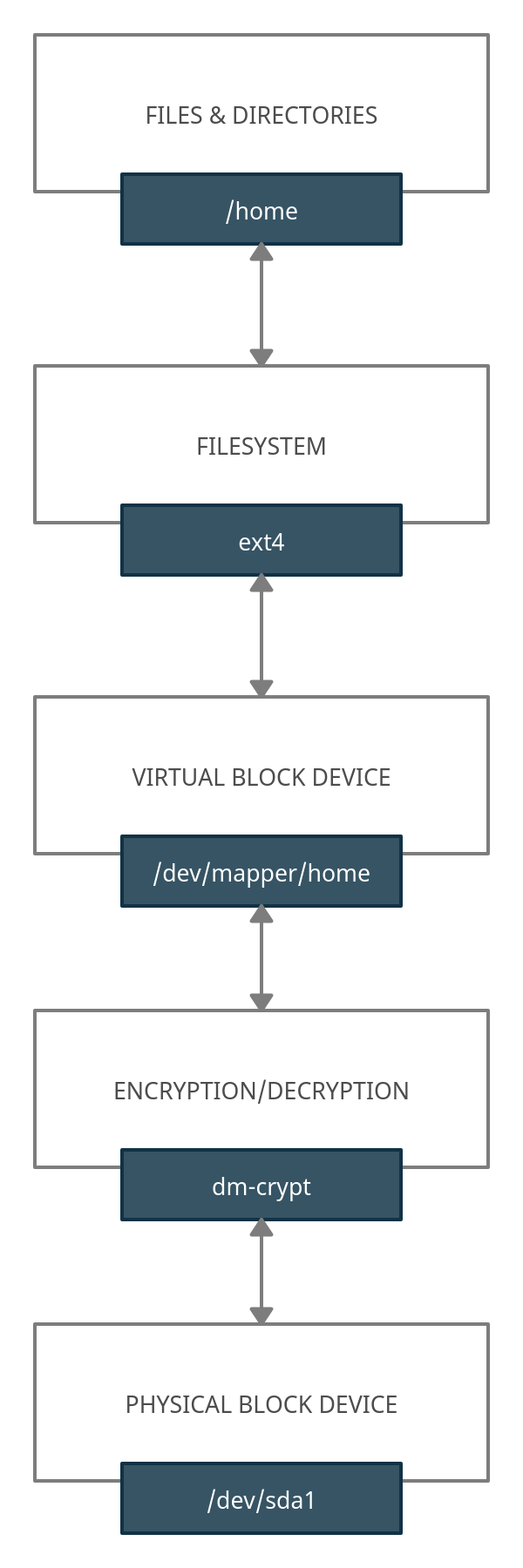
How LUKS works
LUKS (Linux Unified Key Setup), specifically LUKS2, provides a generic key store in a dedicated area on disk, with support for multiple passphrases to unlock the stored key. LUKS2 offers more flexibility in metadata storage compared to the previous version (redundant information to support data recovery in case of corruption).
LUKS headers provide the metadata needed to set up encryption. Here are some of the key features:
- Checksums to detect header corruption or tampering
- The metadata area is stored in two copies to allow for recovery
- Metadata is stored in JSON format, which allows for future extensions without changing the binary structure
- Headers contain objects called tokens, which in turn hold information on where to retrieve the unlock passphrase
Header
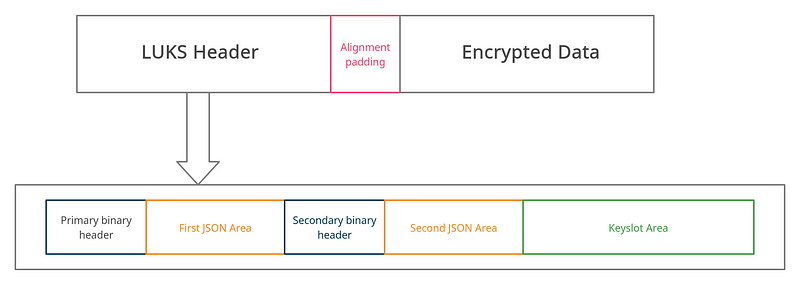
LUKS headers can be split into three parts:
- Binary header (4096 bytes, of which only 512 bytes are actually used)
- JSON metadata
- Keyslot area
As you can see in the image above, the binary part and the JSON area are both stored twice and, under normal conditions (i.e. not during header updates), hold the same values.
The size of the binary header guarantees it’s always written within a single sector (atomic write) to prevent errors and/or corruption during writes.
Binary header
The binary header contains all the information needed to tell the system it’s talking to a LUKS device. What’s stored here is basic information such as labels, a signature indicating this is a LUKS device, the header size, and the metadata checksum (very important!).
The primary header must be stored in sector 0 of the device; the second one starts right after the first JSON area, at a fixed offset as shown below:
Offset  | JSON
[bytes] | [kB]
---------------
16384   |   12
32768   |   28
65536   |   60
131072  |  124
262144  |  252
524288  |  508
1048576 | 1020
2097152 | 2044
4194304 | 4092
JSON Area
The JSON area starts right after the binary header, and its end must be aligned to a 4096-byte sector offset, so the JSON area’s size is:
JSON_Area_size = header_size - 4096
So the offset at which the second binary header starts (shown in the table above) now makes sense: the JSON area size plus the bin_header_size (4096 bytes) has to match the offset. Any unused space is padded with zeros.
Keyslot Area
The Keyslot Area is a section of disk space allocated for binary data coming from the keyslots — this is where the encrypted keys referenced by keyslot metadata are actually stored.
The allocated area is defined inside a keyslot by an “area” object containing the offset (from the start of the device) and the size fields; both fields need to validate correctly, otherwise they’ll be rejected.
Alignment padding
Alignment padding exists to align encrypted data to the start of a block (blocks are encrypted one at a time, typically 512 bytes each) with the correct offset, so LUKS works properly with encrypted sectors.
Metadata
LUKS metadata lets you define an object with a specific role. Unrecognized objects are ignored, but they’re still kept in the JSON metadata.
A LUKS implementation must validate the JSON structure before updating the on-disk headers.
LUKS has the following mandatory objects:
- config — holds the persistent header’s configuration attributes
- keyslot — objects describing the storage areas for encrypted keys
- digest — used to verify that decrypted keys are correct
- segment — describes the disk areas that hold the user’s encrypted data
- token — this field can, in some cases, hold additional metadata, links to other systems (e.g. if headers aren’t stored on disk)
Binary data inside the JSON is stored as Base64, and 64-bit integers are stored as decimal-notation strings.
Now let’s dig into the details of LUKS’s mandatory metadata objects:
Config object
The config object contains these fields, which apply globally across the whole LUKS device:
- json_size — size of the JSON area (in bytes); this must match the binary header
- keyslots_size — size of the binary keyslot area (in bytes); must be aligned to 4096 bytes
- flags — array of strings with persistent flags for the device
- requirements — array of strings for additional features required by the device
Keyslot object
Keyslot objects hold information about the stored keys: the areas where the binary keyslots live, the encryption type, the anti-forensic function used, the password-based key derivation function, and the related parameters.
Each keyslot object contains:
- type — keyslot type
- key_size — size (in bytes) of the key stored in the keyslot
- area — the area assigned within the binary keyslot area
- kdf — PBKDF
- af — anti-forensics. Not used on modern systems (LUKS2)
- priority — the keyslot’s priority: 0 = ignore, 1 = normal, 2 = high
Digest object
To verify that a decrypted key (from a keyslot) is correct, LUKS uses digest objects. These are assigned to keyslots and segments; when not assigned to a segment, they instead refer to an “unbound” key.
Digest objects contain these fields:
- type — digest type
- keyslots — array of keyslot object names assigned to the digest
- segments — array of segment object names assigned to the digest
- salt — binary salt for the digest
- digest — binary digest data
Segment object
The segment object defines the encrypted areas on disk. A normal LUKS device only has a single data segment.
These are the fields:
- type — segment type (currently only crypt is used)
- offset — offset from the start of the device to the start of the segment
- size — segment size (in bytes), or dynamic in case of dynamic device resizing
- iv_tweak — offset for the Initialization Vector
- encryption — the segment’s cipher algorithm, in dm-crypt notation
- sector_size — sector size for the segment (512, 1024, 2048, or 4096 bytes)
- integrity — LUKS2 user-data integrity protection
- flags — array of string objects with additional info for the segment in question
Token object
The token is an object describing how to obtain a passphrase to unlock a particular keyslot, and it can hold additional JSON metadata.
These are the mandatory fields:
- type — defines the token type
- keyslots — array of keyslot objects assigned to the token
LUKS Backup and restore
LUKS Header Backup
Backing up LUKS headers is useful in case the header itself gets corrupted or deleted. If you’re working directly on the raw disk (rather than through the device mapper) for whatever reason, a backup could save you if something goes wrong.
This command creates a file containing your LUKS headers:
sudo cryptsetup luksHeaderBackup /dev/MY_DRIVE --header-backup-file /path/to/backup-file
You can also back up LUKS headers with the dd command:
sudo dd if=/dev/MY_DRIVE of=/path/to/backup-file bs=X count=Y
To use dd you first need to know the header size so you can copy all the data present. Use the luksDump command to get the size and offset information.
LUKS Header Restore
This is the worst-case scenario: losing or corrupting the LUKS headers. If a backup copy exists, you can restore it from a Live OS — this procedure writes the headers back onto the device and lets you use the disk again.
sudo cryptsetup luksHeaderRestore /dev/MY_DRIVE--header-backup-file/path/to/backup-file
LUKS will ask for extra confirmation before running the command:
WARNING!
========
Device /dev/MY_DRIVE already contains LUKS2 header. Replacing header will destroy existing keyslots.

Are you sure? (Type uppercase yes):
How to wipe a LUKS-encrypted disk
If you have a LUKS-encrypted disk, there are two ways to wipe the data on it: delete the LUKS headers located at the start of the encrypted disk, or wipe the entire disk content like you would with any regular disk.
Deleting the LUKS headers
As we saw above, the headers contain all the information needed to unlock a disk — without that information (the keys, specifically), recovering the data is basically impossible.
So it might be enough to wipe the headers with the shred command:
sudo shred --size=LUKS_HEADER_SIZE /dev/MY_DRIVE
If your disk has multiple partitions, make sure you’re targeting the LUKS partition and not the whole disk or the partition table!
You can also wipe the keys with cryptsetup:
sudo cryptsetup erase /dev/MY_DRIVE
Or delete the header with wipefs:
sudo wipefs -a /dev/MY_DRIVE
Wiping the disk
Wiping the whole disk is the simplest approach, but not the fastest. To wipe the data from the disk, you’ll need to boot from a Live OS.
Using shred we can wipe the data on our disk and prevent any kind of forensic activity on it:
sudo shred /dev/MY_DRIVE
dd can also be used, picking a random data source such as urandom/random, or just zeros:
sudo dd if=/dev/urandom of=/dev/MY_DRIVE
or
sudo dd if=/dev/zero of=/dev/MY_DRIVE
Final thoughts
In this article we looked at LUKS, a solid frontend for full disk encryption. It’s important to make sure your LUKS setup is secure (strong cipher suites); if you don’t need the features from the first version of LUKS, just use LUKS2.
We also saw that wiping a LUKS partition can be easier and faster than wiping a regular disk — an interesting point, since at the time of writing (2021) there’s no known way to recover the encrypted data.
If you want to understand how to properly secure your Linux system, not just by enabling Full Disk Encryption, you can dig deeper with this article:
Introduction to Linux Security & Hardening
Stay safe!